
Set your rate.Earn more.
Go online when you want, set your hourly rate, and get paid weekly.


Go online when you want, set your hourly rate, and get paid weekly.
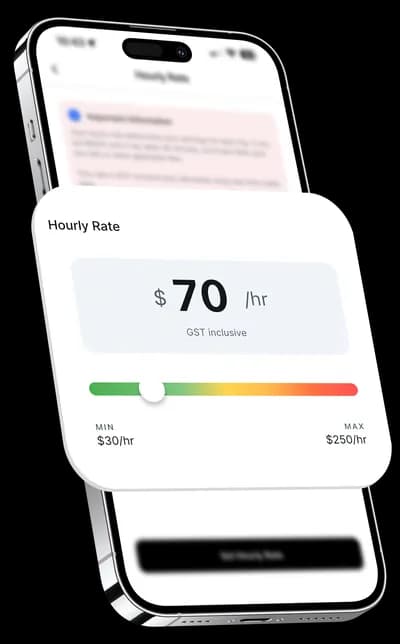
Set your price, not ours. Adjust your rate anytime, see the fare before you accept, and keep more of what you earn with transparent, weekly payouts.
Download the Okly Driver app, create your account, and verify your phone via OTP. Then complete your profile by accepting policies, uploading your profile picture, setting your hourly rate, completing required courses, uploading your personal documents (driver's licence, etc.), adding your vehicle with its documents (registration, insurance, etc.), and adding your bank account for payouts. Once all documents are approved, you're ready to start driving.
You'll need to upload personal documents such as your driver's licence, and vehicle documents including registration and insurance. Some documents require both front and back photos. All documents are reviewed and approved by the Okly team. You'll receive a push notification once approved, or an email with the reason if rejected so you can resubmit.
You need access to a registered vehicle that meets Okly's requirements. Add your vehicle through Settings > Vehicles with details like make, model, licence plate, colour, year, and fuel type. Each vehicle needs its own documents (registration, insurance, etc.) uploaded and approved. You can have multiple vehicles and switch between them.
Go to Settings and tap Hourly Rate. Use the slider to adjust your rate within the minimum and maximum limits set for your city. Your hourly rate determines the trip price shown to customers, which is fixed once a driver accepts the ride. Payouts are processed automatically on a weekly schedule and sent directly to your bank account via Stripe.
Your earnings are based on your hourly rate and the estimated trip time. The fare is calculated as (your hourly rate ÷ 60) × estimated trip minutes and is locked in when you accept the ride. You also earn waiting fees if you wait at stops beyond the grace period. All toll costs are fully reimbursed based on the actual route you drive, verified using GPS tracking.
Yes. As an Okly driver in Australia, you're operating as an independent contractor and are required to have an Australian Business Number (ABN) and be registered for Goods and Services Tax (GST). Once registered, you'll need to lodge quarterly Business Activity Statements (BAS) with the Australian Taxation Office (ATO).
During a trip, tap the shield icon to open the Safety Hub. You can view and copy your current location address to share with emergency contacts, access the Help Center for immediate support specific to your current trip, and call emergency services which directly dials 000 for urgent situations. The Safety Hub is accessible anytime during an active trip.
No. There are no minimum hours required. Simply tap the availability toggle on your home screen to go online when you want to drive, and tap it again to go offline. You have full flexibility to choose when and how often you drive.

Victoria, Australia

Victoria, Australia

New South Wales, Australia